
I’ve been kind of a techie all my life. I taught myself how to program in QBASIC on a 286 when I was just a kid, and was writing custom AUTOEXEC.BAT and CONFIG.SYS files to run games in MS-DOS before I could shave. And like most people into computers, I cared about pretty much one thing: speed. Hard drive capacity and RAM capacity were probably second, especially in those days, as a 20 MB hard drive filled up pretty quick! But what I honestly never cared much about, not as a teenager, as a college student, or as a professional, were those boring chip interconnectivity fabrics. That 286 I had back in the day apparently had a 16-bit data bus and a 24-bit address bus, or so the Internet tells me, but I couldn’t have cared less. We had a keyboard, mouse, printer, and monitor all hooked up. The important thing was that it couldn’t quite run Wolfenstein 3-D.

In the modern server environment, however, those connections matter. If you don’t have a fast memory bus, memory-bound applications will suffer. And if you don’t have lots of peripheral lanes, what you can connect to that server will be limited. Let’s take, for example, an IBM Power E1050 configured for multiple users running data analytics workloads. I’ve got 96 cores (4 x 24c DCMs), eight 12-core logical partitions (LPARs), and each LPAR connected over its own 32 Gb Fibre Channel card to an IBM FlashSystem 7300. Each of those Fibre Channel cards takes 8 PCIe Gen 4 lanes, for 64 total lanes. Fortunately each DCM has 9 PCIe x8 Gen4-capable slots, so we can easily fit all eight cards into the system, plus have two left so we can put in a standard Ethernet card.
But let’s look a little more closely at what Power10 can really do. There’s a differnce between a PCIe lane and a PCIe slot. Lanes are what feed the CPU, while a slot is the physical link on the board that typically feeds 8-16 lanes. Just over half of the available PCIe lanes can be populated using the available slots. However, an E1050 can be augmented with expansion drawers, which allow even more peripherals to be attached.
Okay, so you’re probably wondering how PowerAXON fits into this, and why it matters for AI.
The CPUs in a multi-socket server have to be able to talk to each other. See, I may have eight FibreChannel cards, but it’s not like each one is hard-linked to a specific CPU socket. My one network card is shared by all four sockets. Not only that, but each CPU can access every other CPU’s memory over what’s called a NUMA network. In x86 world, multi-socket CPUs connect using PCIe lanes. For example, let’s take Intel’s recent flagship CPU architecture, Granite Rapids, which has 136 PCIe Gen 5 lanes. That’s a lot, but in a multi-socket configuration, those PCIe links have to be traded in for UPI links, so the dual-socket server has 256 cores and 192 PCIe lanes.
PowerAXON is a whole separate fabric apart from the PCIe lanes. PowerAXON shares a design heritage with NVLink and has a blazing fast speed of 1 TB/s, over three times faster than the six UPI links in Granite Rapids. This allows dual-chip modules in a quad-socket configuration to host an enormous coherent memory space while still having plenty of room for all the PCIe peripherals you could throw at it.
Now, how’s this matter for AI?
Modern GPUs, currently the favored hardware for AI, cram as much compute power in a small space as possible. One of these accelerators can draw nearly 800W, which requires a massive heat sink to dissipate. An 8-GPU server may be as large as 10U, and nearly all that space is for those huge heat sinks. But even with the largest heat sinks ever seen in a rack server, there’s so much severe thermal cycling on these cards that they typically last only 1-2 years under demanding workloads. That’s not good enough for mission-critical systems.
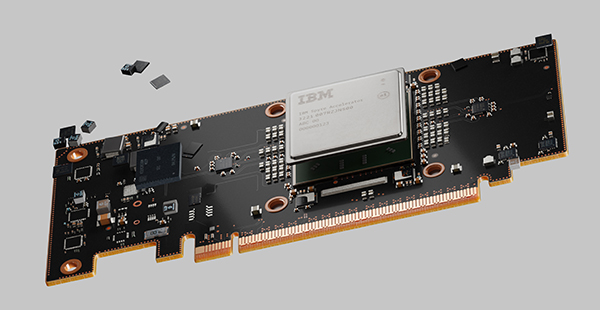
IBM’s Spyre Artificial Intelligence Unit (AIU), already out in z17 mainframes, is a lightweight card that consumes just 75W over a PCIe connector. Because it consumes so little energy, it won’t be prone to the thermal cycling and parts failures that kill datacenter GPUs regularly. While they won’t be available until Power11 later this year, we can see from the z17 Redbook what is possible. On z17, Spyre comes in 8-card assemblies, and you can combine up to 6 of these assemblies via expansion drawers for a total of 48 cards. 48 cards is a lot, but we can expect that thanks to PowerAXON leaving all 256 PCIe lanes open for peripherals, Spyre-accelerated Power11 systems will deliver plenty of inferencing power right where your data is without having to offload anything to a GPU server and without parts failing at critical moments.
While CPU cores and accelerator compute performance is what grabs the headlines, the fan-out architectures we find IBM Power servers wouldn’t be possible without the immense number of PCIe lanes they keep open. IBM’s leadership in connectivity technology is what enables computing at scales you won’t find anywhere else.